I am using the attached openwrt version in this directory from the Heltec Website
But the files doesn’t specify any RPI connection from HT-HC01P for the overlay used by Heltec
I extracted the flashable file and tried reading the DTBO file but its garbled
Already reached out to Heltec but still have not received any reply
Hi @lenka
The dtb file is binary, so you will need to use dtc to decompile it. See attached decompiled mm610x-spi.dts
/dts-v1/;

/ {
        compatible = "brcm,bcm2835\0brcm,bcm2836\0brcm,bcm2708\0brcm,bcm2709\0brcm,bcm2711";

        fragment@0 {
                target = <0xffffffff>;

                __overlay__ {
                        pinctrl-0 = <0x01 0x02>;
                        cs-gpios = <0xffffffff 0x08 0x01>;
                        #address-cells = <0x01>;
                        #size-cells = <0x00>;
                        status = "okay";
                        phandle = <0x03>;

                        mm6108@0 {
                                compatible = "morse,mm610x-spi";
                                reg = <0x00>;
                                reset-gpios = <0xffffffff 0x05 0x00>;
                                power-gpios = <0xffffffff 0x03 0x00 0xffffffff 0x07 0x00>;
                                spi-irq-gpios = <0xffffffff 0x19 0x00>;
                                spi-max-frequency = <0x2faf080>;
                                status = "okay";
                                phandle = <0x04>;
                        };

                        spidev@0 {
                                reg = <0x00>;
                                status = "disabled";
                                phandle = <0x05>;
                        };

                        spidev@1 {
                                reg = <0x01>;
                                status = "disabled";
                                phandle = <0x06>;
                        };
                };
        };

        fragment@1 {
                target = <0xffffffff>;

                __overlay__ {

                        spi0_cs_pins {
                                brcm,pins = <0x08>;
                                brcm,function = <0x01>;
                                brcm,pull = <0x02>;
                                phandle = <0x02>;
                        };

                        spi0_pins {
                                brcm,pull = <0x02 0x02 0x02>;
                                phandle = <0x01>;
                        };
                };
        };

        __symbols__ {
                frag0 = "/fragment@0/__overlay__";
                mm6108 = "/fragment@0/__overlay__/mm6108@0";
                spidev0 = "/fragment@0/__overlay__/spidev@0";
                spidev1 = "/fragment@0/__overlay__/spidev@1";
                spi0_cs_pins = "/fragment@1/__overlay__/spi0_cs_pins";
                spi0_pins = "/fragment@1/__overlay__/spi0_pins";
        };

        __fixups__ {
                spi0 = "/fragment@0:target:0";
                gpio = "/fragment@0/__overlay__:cs-gpios:0\0/fragment@0/__overlay__/mm6108@0:reset-gpios:0\0/fragment@0/__overlay__/mm6108@0:power-gpios:0\0/fragment@0/__overlay__/mm6108@0:power-gpios:12\0/fragment@0/__overlay__/mm6108@0:spi-irq-gpios:0\0/fragment@1:target:0";
        };

        __local_fixups__ {

                fragment@0 {

                        __overlay__ {
                                pinctrl-0 = <0x00 0x04>;
                        };
                };
        };
};
Note that this is the same pinout used for the Raspberry Pi hat used in our EKH01 evaluation kit, with resistors populated for SPI. Schematics available here
I am trying get HT-HC01P +debug EVB working with RPi4. Table below shows connections between EVB pins and RPi GPIOs
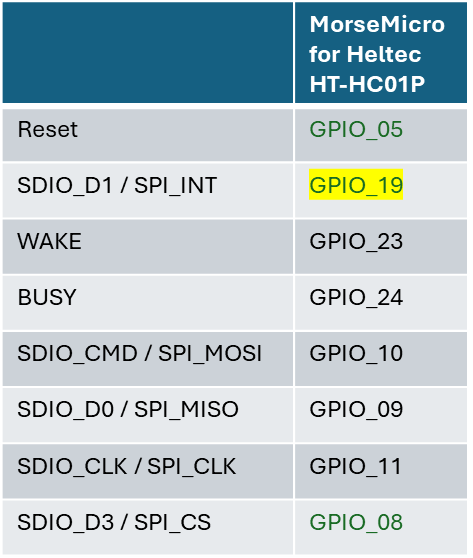
I tried openwrt-23.05.5-2.8.5-20251107-rpi4-HT-HC01P-sysupgrade.img and openwrt-morse-2.8.5-morsemicro-mm6108-ekh01-squashfs-sysupgrade.img
I also tried RPi+WM1302+WM6108 configuration but with the same result - system doesn’t see the Halow board. It gives me this error message => “Error: No HaLow radio found”
It looks like I am missing something very basic here. Can you please, guide me how to get it working?
Hi @evgyank2025
Thanks for sharing the pinout table. Please try connecting WAKE and BUSY to pins 3 and 7 respectively and see if that helps your interface become detected. Also, make sure to keep leads short, as the SPI bus will operate with quite fast rise times, and poor signal integrity can prevent the host from communicating with the board.
If you can share the output of dmesg when using the Heltec image, we can help explain why it might not be detected.
Hi ajudge
Thank you for your recommendations.
I tried to rewire WAKE (GPIO 3) and BUSY (GPIO 7) signals as you suggested and run with this Heltec image “openwrt-23.05.5-2.8.5-20251107-rpi4-HT-HC01P-sysupgrade.img”. But with the same result:
On the Home page in the Mode tab I see “No HaLow enabled” and when I try to use any Wizards I get error message: “Configuration incompatible with config wizard detected (Error: No HaLow radio found). If you wish to use the wizard, you should reset or reflash your device.“
I emailed Heltec regarding missing information about RPi and HT-HC-01P connections. They recently replied and posted this schematic
I noticed difference in INT connection there and MM recommendations => MM(GPIO19) vs Heltec(GPIO25). I tried them both. “No HaLow enabled” for both cases.
I put below dmesg command output that I took with above-mentioned image (openwrt-23.05.5-2.8.5-20251107-rpi4-HT-HC01P-sysupgrade.img)
SPI issue is still there:
root@HT-HC01P-94EF:~# dmesg | grep spi
[    0.000000] Linux version 5.15.167 (halow-raspi@ubuntu) (aarch64-openwrt-linux-musl-gcc (OpenWrt GCC 12.3.0 r0+24271-bc42a5ccf5) 12.3.0, GNU ld (GNU Binutils) 2.40.0) #0 SMP Mon Jun 23 03:11:26 2025
[    0.267216] spi-bcm2835 fe204000.spi: could not get clk: -517
[    6.538391] morse_spi spi0.0: morse_spi_probe: failed to init SPI with CMD63 (ret:-61)
[    6.546323] morse_spi_probe failed. The driver has not been loaded!
[    6.552593] morse_spi: probe of spi0.0 failed with error -61
Also, I checked ls /dev/spidev*’ and I didn’t see any active interfaces.
Any ideas and recommendations would be very welcome
HT-HC01P-94EF login: root
Password:

BusyBox v1.36.1 (2025-06-23 03:11:26 UTC) built-in shell (ash)

---

| |   | | |  ***| | |      |***   ***| |  |  / |
| |***| | | |  | |          | |     | |  / /
|  ___  | |  **| | |          | |     |  | | |
| |   | | | |**  | |     | |     | |___   _____
|*|   |*| |**| |***|    |*|     |_***|  _***|

---

## OpenWrt 23.05.5, 2.8.5-20251107

root@HT-HC01P-94EF:~#
root@HT-HC01P-94EF:~#
root@HT-HC01P-94EF:~# dmesg
[    0.000000] Booting Linux on physical CPU 0x0000000000 [0x410fd083]
[    0.000000] Linux version 5.15.167 (halow-raspi@ubuntu) (aarch64-openwrt-linux-musl-gcc (OpenWrt GCC 12.3.0 r0+24271-bc42a5ccf5) 12.3.0, GNU ld (GNU Binutils) 2.40.0) #0 SMP Mon Jun 23 03:11:26 2025
[    0.000000] random: crng init done
[    0.000000] Machine model: Raspberry Pi 4 Model B Rev 1.5
[    0.000000] Reserved memory: created CMA memory pool at 0x000000002ac00000, size 64 MiB
[    0.000000] OF: reserved mem: initialized node linux,cma, compatible id shared-dma-pool
[    0.000000] Zone ranges:
[    0.000000]   DMA      [mem 0x0000000000000000-0x000000003fffffff]
[    0.000000]   DMA32    [mem 0x0000000040000000-0x00000000fbffffff]
[    0.000000]   Normal   empty
[    0.000000] Movable zone start for each node
[    0.000000] Early memory node ranges
[    0.000000]   node   0: [mem 0x0000000000000000-0x0000000037ffffff]
[    0.000000]   node   0: [mem 0x0000000040000000-0x00000000fbffffff]
[    0.000000] Initmem setup node 0 [mem 0x0000000000000000-0x00000000fbffffff]
[    0.000000] On node 0, zone DMA32: 16384 pages in unavailable ranges
[    0.000000] percpu: Embedded 18 pages/cpu s34904 r8192 d30632 u73728
[    0.000000] pcpu-alloc: s34904 r8192 d30632 u73728 alloc=18*4096
[    0.000000] pcpu-alloc: [0] 0 [0] 1 [0] 2 [0] 3
[    0.000000] Detected PIPT I-cache on CPU0
[    0.000000] CPU features: detected: Spectre-v2
[    0.000000] CPU features: detected: Spectre-v4
[    0.000000] CPU features: detected: Spectre-BHB
[    0.000000] CPU features: detected: ARM errata 1165522, 1319367, or 1530923
[    0.000000] Built 1 zonelists, mobility grouping on.  Total pages: 983808
[    0.000000] Kernel command line: coherent_pool=1M 8250.nr_uarts=1 snd_bcm2835.enable_compat_alsa=0 snd_bcm2835.enable_hdmi=1 bcm2708_fb.fbwidth=0 bcm2708_fb.fbheight=0 bcm2708_fb.fbswap=1 smsc95xx.macaddr=2C:CF:67:80:94:EF vc_mem.mem_base=0x3ec00000 vc_mem.mem_size=0x40000000  console=ttyAMA0 console=ttyUSB0,115200 console=tty1 root=/dev/mmcblk0p2 rootfstype=squashfs,ext4 rootwait
[    0.000000] Dentry cache hash table entries: 524288 (order: 10, 4194304 bytes, linear)
[    0.000000] Inode-cache hash table entries: 262144 (order: 9, 2097152 bytes, linear)
[    0.000000] mem auto-init: stack:off, heap alloc:off, heap free:off
[    0.000000] software IO TLB: mapped [mem 0x0000000030000000-0x0000000034000000] (64MB)
[    0.000000] Memory: 3774056K/3997696K available (8448K kernel code, 918K rwdata, 2144K rodata, 448K init, 554K bss, 158104K reserved, 65536K cma-reserved)
[    0.000000] SLUB: HWalign=64, Order=0-3, MinObjects=0, CPUs=4, Nodes=1
[    0.000000] rcu: Hierarchical RCU implementation.
[    0.000000]  Tracing variant of Tasks RCU enabled.
[    0.000000] rcu: RCU calculated value of scheduler-enlistment delay is 10 jiffies.
[    0.000000] NR_IRQS: 64, nr_irqs: 64, preallocated irqs: 0
[    0.000000] Root IRQ handler: gic_handle_irq
[    0.000000] GIC: Using split EOI/Deactivate mode
[    0.000000] arch_timer: cp15 timer(s) running at 54.00MHz (phys).
[    0.000000] clocksource: arch_sys_counter: mask: 0xffffffffffffff max_cycles: 0xc743ce346, max_idle_ns: 440795203123 ns
[    0.000001] sched_clock: 56 bits at 54MHz, resolution 18ns, wraps every 4398046511102ns
[    0.000213] Console: colour dummy device 80x25
[    0.000496] printk: console [tty1] enabled
[    0.000536] Calibrating delay loop (skipped), value calculated using timer frequency.. 108.00 BogoMIPS (lpj=540000)
[    0.000560] pid_max: default: 32768 minimum: 301
[    0.000799] Mount-cache hash table entries: 8192 (order: 4, 65536 bytes, linear)
[    0.000872] Mountpoint-cache hash table entries: 8192 (order: 4, 65536 bytes, linear)
[    0.001490] cgroup: Disabling memory control group subsystem
[    0.002498] rcu: Hierarchical SRCU implementation.
[    0.003180] smp: Bringing up secondary CPUs …
[    0.003592] Detected PIPT I-cache on CPU1
[    0.003656] CPU1: Booted secondary processor 0x0000000001 [0x410fd083]
[    0.004137] Detected PIPT I-cache on CPU2
[    0.004180] CPU2: Booted secondary processor 0x0000000002 [0x410fd083]
[    0.004627] Detected PIPT I-cache on CPU3
[    0.004669] CPU3: Booted secondary processor 0x0000000003 [0x410fd083]
[    0.004744] smp: Brought up 1 node, 4 CPUs
[    0.004802] SMP: Total of 4 processors activated.
[    0.004815] CPU features: detected: 32-bit EL0 Support
[    0.004827] CPU features: detected: CRC32 instructions
[    0.004909] CPU features: emulated: Privileged Access Never (PAN) using TTBR0_EL1 switching
[    0.004928] CPU: All CPU(s) started at EL2
[    0.004958] alternatives: patching kernel code
[    0.013607] clocksource: jiffies: mask: 0xffffffff max_cycles: 0xffffffff, max_idle_ns: 19112604462750000 ns
[    0.013663] futex hash table entries: 1024 (order: 4, 65536 bytes, linear)
[    0.015193] pinctrl core: initialized pinctrl subsystem
[    0.016190] NET: Registered PF_NETLINK/PF_ROUTE protocol family
[    0.017777] DMA: preallocated 1024 KiB GFP_KERNEL pool for atomic allocations
[    0.018013] DMA: preallocated 1024 KiB GFP_KERNEL|GFP_DMA pool for atomic allocations
[    0.018398] DMA: preallocated 1024 KiB GFP_KERNEL|GFP_DMA32 pool for atomic allocations
[    0.018836] thermal_sys: Registered thermal governor ‘step_wise’
[    0.018973] cpuidle: using governor ladder
[    0.019014] cpuidle: using governor menu
[    0.019226] ASID allocator initialised with 65536 entries
[    0.019316] Serial: AMBA PL011 UART driver
[    0.020407] printk: console [ramoops-1] enabled
[    0.020424] pstore: Registered ramoops as persistent store backend
[    0.020438] ramoops: using 0x100000@0x34000000, ecc: 0
[    0.024896] bcm2835-mbox fe00b880.mailbox: mailbox enabled
[    0.049952] raspberrypi-firmware soc:firmware: Attached to firmware from 2023-10-17T15:39:16, variant start
[    0.059968] raspberrypi-firmware soc:firmware: Firmware hash is 30f0c5e4d076da3ab4f341d88e7d505760b93ad7
[    0.092651] cryptd: max_cpu_qlen set to 1000
[    0.094653] bcm2835-dma fe007000.dma: DMA legacy API manager, dmachans=0x1
[    0.096796] SCSI subsystem initialized
[    0.096950] usbcore: registered new interface driver usbfs
[    0.097000] usbcore: registered new interface driver hub
[    0.097043] usbcore: registered new device driver usb
[    0.097169] usb_phy_generic phy: supply vcc not found, using dummy regulator
[    0.098437] clocksource: Switched to clocksource arch_sys_counter
[    0.101857] NET: Registered PF_INET protocol family
[    0.102358] IP idents hash table entries: 65536 (order: 7, 524288 bytes, linear)
[    0.105104] tcp_listen_portaddr_hash hash table entries: 2048 (order: 3, 32768 bytes, linear)
[    0.105172] Table-perturb hash table entries: 65536 (order: 6, 262144 bytes, linear)
[    0.105202] TCP established hash table entries: 32768 (order: 6, 262144 bytes, linear)
[    0.105405] TCP bind hash table entries: 32768 (order: 7, 524288 bytes, linear)
[    0.105918] TCP: Hash tables configured (established 32768 bind 32768)
[    0.106120] UDP hash table entries: 2048 (order: 4, 65536 bytes, linear)
[    0.106190] UDP-Lite hash table entries: 2048 (order: 4, 65536 bytes, linear)
[    0.106385] NET: Registered PF_UNIX/PF_LOCAL protocol family
[    0.106439] PCI: CLS 0 bytes, default 64
[    0.110056] workingset: timestamp_bits=46 max_order=20 bucket_order=0
[    0.114433] squashfs: version 4.0 (2009/01/31) Phillip Lougher
[    0.180563] Block layer SCSI generic (bsg) driver version 0.4 loaded (major 250)
[    0.183858] brcm-pcie fd500000.pcie: host bridge /scb/pcie@7d500000 ranges:
[    0.183906] brcm-pcie fd500000.pcie:   No bus range found for /scb/pcie@7d500000, using [bus 00-ff]
[    0.183954] brcm-pcie fd500000.pcie:      MEM 0x0600000000..0x063fffffff → 0x00c0000000
[    0.183998] brcm-pcie fd500000.pcie:   IB MEM 0x0000000000..0x00ffffffff → 0x0400000000
[    0.240496] brcm-pcie fd500000.pcie: link up, 5.0 GT/s PCIe x1 (SSC)
[    0.240681] brcm-pcie fd500000.pcie: PCI host bridge to bus 0000:00
[    0.240702] pci_bus 0000:00: root bus resource [bus 00-ff]
[    0.240723] pci_bus 0000:00: root bus resource [mem 0x600000000-0x63fffffff] (bus address [0xc0000000-0xffffffff])
[    0.240785] pci 0000:00:00.0: [14e4:2711] type 01 class 0x060400
[    0.240870] pci 0000:00:00.0: PME# supported from D0 D3hot
[    0.244461] pci 0000:00:00.0: bridge configuration invalid ([bus 00-00]), reconfiguring
[    0.244640] pci 0000:01:00.0: [1106:3483] type 00 class 0x0c0330
[    0.244713] pci 0000:01:00.0: reg 0x10: [mem 0x00000000-0x00000fff 64bit]
[    0.244871] pci 0000:01:00.0: PME# supported from D0 D3hot
[    0.248393] pci_bus 0000:01: busn_res: [bus 01-ff] end is updated to 01
[    0.248467] pci 0000:00:00.0: BAR 8: assigned [mem 0x600000000-0x6000fffff]
[    0.248494] pci 0000:01:00.0: BAR 0: assigned [mem 0x600000000-0x600000fff 64bit]
[    0.248554] pci 0000:00:00.0: PCI bridge to [bus 01]
[    0.248572] pci 0000:00:00.0:   bridge window [mem 0x600000000-0x6000fffff]
[    0.248745] pcieport 0000:00:00.0: enabling device (0000 → 0002)
[    0.248873] pcieport 0000:00:00.0: PME: Signaling with IRQ 44
[    0.249168] pcieport 0000:00:00.0: AER: enabled with IRQ 44
[    0.249792] bcm2708_fb soc:fb: Unable to determine number of FBs. Disabling driver.
[    0.249817] bcm2708_fb: probe of soc:fb failed with error -2
[    0.253816] Serial: 8250/16550 driver, 1 ports, IRQ sharing enabled
[    0.254140] bcm2835-aux-uart fe215040.serial: there is not valid maps for state default
[    0.254813] iproc-rng200 fe104000.rng: hwrng registered
[    0.254937] vc-mem: phys_addr:0x00000000 mem_base=0x3ec00000 mem_size:0x40000000(1024 MiB)
[    0.255404] gpiomem-bcm2835 fe200000.gpiomem: Initialised: Registers at 0xfe200000
[    0.262478] brd: module loaded
[    0.265625] loop: module loaded
[    0.266393] Loading iSCSI transport class v2.0-870.
[    0.267216] spi-bcm2835 fe204000.spi: could not get clk: -517
[    0.268800] bcmgenet fd580000.ethernet: GENET 5.0 EPHY: 0x0000
[    0.448491] unimac-mdio unimac-mdio.-19: Broadcom UniMAC MDIO bus
[    0.494899] xhci_hcd 0000:01:00.0: xHCI Host Controller
[    0.494939] xhci_hcd 0000:01:00.0: new USB bus registered, assigned bus number 1
[    0.495422] xhci_hcd 0000:01:00.0: hcc params 0x002841eb hci version 0x100 quirks 0x0003800000000890
[    0.496061] xhci_hcd 0000:01:00.0: xHCI Host Controller
[    0.496087] xhci_hcd 0000:01:00.0: new USB bus registered, assigned bus number 2
[    0.496113] xhci_hcd 0000:01:00.0: Host supports USB 3.0 SuperSpeed
[    0.496341] usb usb1: New USB device found, idVendor=1d6b, idProduct=0002, bcdDevice= 5.15
[    0.496368] usb usb1: New USB device strings: Mfr=3, Product=2, SerialNumber=1
[    0.496389] usb usb1: Product: xHCI Host Controller
[    0.496405] usb usb1: Manufacturer: Linux 5.15.167 xhci-hcd
[    0.496420] usb usb1: SerialNumber: 0000:01:00.0
[    0.496757] hub 1-0:1.0: USB hub found
[    0.496802] hub 1-0:1.0: 1 port detected
[    0.497252] usb usb2: New USB device found, idVendor=1d6b, idProduct=0003, bcdDevice= 5.15
[    0.497279] usb usb2: New USB device strings: Mfr=3, Product=2, SerialNumber=1
[    0.497299] usb usb2: Product: xHCI Host Controller
[    0.497314] usb usb2: Manufacturer: Linux 5.15.167 xhci-hcd
[    0.497330] usb usb2: SerialNumber: 0000:01:00.0
[    0.497637] hub 2-0:1.0: USB hub found
[    0.497680] hub 2-0:1.0: 4 ports detected
[    0.498526] dwc_otg: version 3.00a 10-AUG-2012 (platform bus)
[    0.498626] dwc_otg: FIQ enabled
[    0.498632] dwc_otg: NAK holdoff enabled
[    0.498637] dwc_otg: FIQ split-transaction FSM enabled
[    0.498644] Module dwc_common_port init
[    0.498960] usbcore: registered new interface driver uas
[    0.499039] usbcore: registered new interface driver usb-storage
[    0.499122] usbcore: registered new interface driver usbserial_generic
[    0.499152] usbserial: USB Serial support registered for generic
[    0.499191] usbcore: registered new interface driver cp210x
[    0.499220] usbserial: USB Serial support registered for cp210x
[    0.499267] usbcore: registered new interface driver ftdi_sio
[    0.499294] usbserial: USB Serial support registered for FTDI USB Serial Device
[    0.499369] usbcore: registered new interface driver pl2303
[    0.499401] usbserial: USB Serial support registered for pl2303
[    0.499482] mousedev: PS/2 mouse device common for all mice
[    0.500022] bcm2835-wdt bcm2835-wdt: Broadcom BCM2835 watchdog timer
[    0.503693] sdhci: Secure Digital Host Controller Interface driver
[    0.503704] sdhci: Copyright(c) Pierre Ossman
[    0.503895] mmc-bcm2835 fe300000.mmc: could not get clk, deferring probe
[    0.504056] sdhci-pltfm: SDHCI platform and OF driver helper
[    0.508271] NET: Registered PF_INET6 protocol family
[    0.508807] Segment Routing with IPv6
[    0.508825] In-situ OAM (IOAM) with IPv6
[    0.508859] NET: Registered PF_PACKET protocol family
[    0.508882] bridge: filtering via arp/ip/ip6tables is no longer available by default. Update your scripts to load br_netfilter if you need this.
[    0.508940] 8021q: 802.1Q VLAN Support v1.8
[    0.509304] Key type .fscrypt registered
[    0.509311] Key type fscrypt-provisioning registered
[    0.509537] pstore: Using crash dump compression: deflate
[    0.512392] uart-pl011 fe201000.serial: there is not valid maps for state default
[    0.512571] uart-pl011 fe201000.serial: cts_event_workaround enabled
[    0.512648] fe201000.serial: ttyAMA0 at MMIO 0xfe201000 (irq = 17, base_baud = 0) is a PL011 rev2
[    0.788427] usb 1-1: new high-speed USB device number 2 using xhci_hcd
[    0.790300] printk: console [ttyAMA0] enabled
[    0.971010] usb 1-1: New USB device found, idVendor=2109, idProduct=3431, bcdDevice= 4.21
[    0.972449] fe201a00.serial: ttyAMA1 at MMIO 0xfe201a00 (irq = 17, base_baud = 0) is a PL011 rev2
[    0.976136] usb 1-1: New USB device strings: Mfr=0, Product=1, SerialNumber=0
[    1.041477] bcm2835-aux-uart fe215040.serial: there is not valid maps for state default
[    1.046457] usb 1-1: Product: USB2.0 Hub
[    1.051932] fe215040.serial: ttyS0 at MMIO 0xfe215040 (irq = 19, base_baud = 62500000) is a 16550
[    1.057805] hub 1-1:1.0: USB hub found
[    1.064067] bcm2835-power bcm2835-power: Broadcom BCM2835 power domains driver
[    1.070091] hub 1-1:1.0: 4 ports detected
[    1.075599] mmc-bcm2835 fe300000.mmc: mmc_debug:0 mmc_debug2:0
[    1.754345] mmc-bcm2835 fe300000.mmc: DMA channel allocated
[    1.785858] of_cfs_init
[    1.788366] of_cfs_init: OK
[    1.791528] clk: Disabling unused clocks
[    1.834749] mmc0: SDHCI controller on fe340000.mmc [fe340000.mmc] using ADMA
[    1.841944] Waiting for root device /dev/mmcblk0p2…
[    1.885235] mmc1: new high speed SDIO card at address 0001
[    1.941888] mmc0: new ultra high speed DDR50 SDHC card at address aaaa
[    1.948802] mmcblk0: mmc0:aaaa SD32G 29.7 GiB
[    1.954072]  mmcblk0: p1 p2
[    1.956980] mmcblk0: mmc0:aaaa SD32G 29.7 GiB (quirks 0x00004000)
[    1.991206] VFS: Mounted root (squashfs filesystem) readonly on device 179:2.
[    1.998621] Freeing unused kernel memory: 448K
[    2.003134] Run /sbin/init as init process
[    2.007223]   with arguments:
[    2.007225]     /sbin/init
[    2.007227]   with environment:
[    2.007228]     HOME=/
[    2.007230]     TERM=linux
[    2.112636] init: Console is alive
[    2.116137] init: - watchdog -
[    2.533942] kmodloader: loading kernel modules from /etc/modules-boot.d/*
[    2.590155] kmodloader: done loading kernel modules from /etc/modules-boot.d/*
[    2.602619] init: - preinit -
[    2.761891] uart-pl011 fe201000.serial: no DMA platform data
[    4.782946] loop0: detected capacity change from 0 to 614400
[    4.858441] loop0: detected capacity change from 614400 to 541312
[    5.029593] F2FS-fs (loop0): Mounted with checkpoint version = 47aee80
[    5.036675] mount_root: switching to f2fs overlay
[    5.042002] overlayfs: null uuid detected in lower fs ‘/’, falling back to xino=off,index=off,nfs_export=off.
[    5.064255] insmod: module is already loaded - fat
[    5.070218] insmod: module is already loaded - vfat
[    5.087845] FAT-fs (mmcblk0p1): Volume was not properly unmounted. Some data may be corrupt. Please run fsck.
[    5.098562] urandom-seed: Seeding with /etc/urandom.seed
[    5.126515] procd: - early -
[    5.129496] procd: - watchdog -
[    5.663827] procd: - watchdog -
[    5.676745] procd: - ubus -
[    5.733646] procd: - init -
[    6.061269] kmodloader: loading kernel modules from /etc/modules.d/*
[    6.085581] tun: Universal TUN/TAP device driver, 1.6
[    6.092334] i2c_dev: i2c /dev entries driver
[    6.099930] mc: Linux media interface: v0.10
[    6.106186] videodev: Linux video capture interface: v2.00
[    6.113591] hid: raw HID events driver (C) Jiri Kosina
[    6.119134] vc_sm_cma: module is from the staging directory, the quality is unknown, you have been warned.
[    6.129175] bcm2835_vc_sm_cma_probe: Videocore shared memory driver
[    6.135444] [vc_sm_connected_init]: start
[    6.139906] [vc_sm_connected_init]: installed successfully
[    6.147227] bcm2835_mmal_vchiq: module is from the staging directory, the quality is unknown, you have been warned.
[    6.158490] bcm2835_isp: module is from the staging directory, the quality is unknown, you have been warned.
[    6.170555] bcm2835-isp bcm2835-isp: Device node output[0] registered as /dev/video13
[    6.178539] bcm2835-isp bcm2835-isp: Device node capture[0] registered as /dev/video14
[    6.186561] bcm2835-isp bcm2835-isp: Device node capture[1] registered as /dev/video15
[    6.194563] bcm2835-isp bcm2835-isp: Device node stats[2] registered as /dev/video16
[    6.202317] bcm2835-isp bcm2835-isp: Register output node 0 with media controller
[    6.209805] bcm2835-isp bcm2835-isp: Register capture node 1 with media controller
[    6.217369] bcm2835-isp bcm2835-isp: Register capture node 2 with media controller
[    6.224935] bcm2835-isp bcm2835-isp: Register capture node 3 with media controller
[    6.234302] bcm2835-isp bcm2835-isp: Device node output[0] registered as /dev/video20
[    6.242289] bcm2835-isp bcm2835-isp: Device node capture[0] registered as /dev/video21
[    6.250440] bcm2835-isp bcm2835-isp: Device node capture[1] registered as /dev/video22
[    6.258434] bcm2835-isp bcm2835-isp: Device node stats[2] registered as /dev/video23
[    6.266178] bcm2835-isp bcm2835-isp: Register output node 0 with media controller
[    6.273663] bcm2835-isp bcm2835-isp: Register capture node 1 with media controller
[    6.281231] bcm2835-isp bcm2835-isp: Register capture node 2 with media controller
[    6.288799] bcm2835-isp bcm2835-isp: Register capture node 3 with media controller
[    6.296395] bcm2835-isp bcm2835-isp: Loaded V4L2 bcm2835-isp
[    6.305013] bcm2835_codec: module is from the staging directory, the quality is unknown, you have been warned.
[    6.317137] bcm2835-codec bcm2835-codec: Device registered as /dev/video10
[    6.324060] bcm2835-codec bcm2835-codec: Loaded V4L2 decode
[    6.332533] bcm2835-codec bcm2835-codec: Device registered as /dev/video11
[    6.339429] bcm2835-codec bcm2835-codec: Loaded V4L2 encode
[    6.346951] bcm2835-codec bcm2835-codec: Device registered as /dev/video12
[    6.353851] bcm2835-codec bcm2835-codec: Loaded V4L2 isp
[    6.360439] bcm2835-codec bcm2835-codec: Device registered as /dev/video18
[    6.367315] bcm2835-codec bcm2835-codec: Loaded V4L2 image_fx
[    6.374606] bcm2835-codec bcm2835-codec: Device registered as /dev/video31
[    6.381502] bcm2835-codec bcm2835-codec: Loaded V4L2 encode_image
[    6.388681] snd_bcm2835: module is from the staging directory, the quality is unknown, you have been warned.
[    6.399763] GACT probability on
[    6.403241] Mirror/redirect action on
[    6.408848] u32 classifier
[    6.411563]     input device check on
[    6.415216]     Actions configured
[    6.422769] usbcore: registered new interface driver cdc_acm
[    6.428451] cdc_acm: USB Abstract Control Model driver for USB modems and ISDN adapters
[    6.436694] Loading modules backported from Linux version v6.1.110-0-g5f55cad62cc9d
[    6.444355] Backport generated by backports.git v6.1.110-1-0-g965f73fc
[    6.453855] usbcore: registered new interface driver lan78xx
[    6.465363] usbcore: registered new interface driver usbhid
[    6.470968] usbhid: USB HID core driver
[    6.476991] usbcore: registered new interface driver uvcvideo
[    6.485638] xt_time: kernel timezone is -0000
[    6.490477] usbcore: registered new interface driver cdc_ether
[    6.502506] Morse Micro Dot11ah driver registration. Version 0-rel_1_15_3_2025_Apr_16
[    6.531035] morse micro driver registration. Version 0-rel_1_15_3_2025_Apr_16
[    6.538391] morse_spi spi0.0: morse_spi_probe: failed to init SPI with CMD63 (ret:-61)
[    6.546323] morse_spi_probe failed. The driver has not been loaded!
[    6.552593] morse_spi: probe of spi0.0 failed with error -61
[    6.558295] usbcore: registered new interface driver morse_usb
[    6.578013] PPP generic driver version 2.4.2
[    6.582826] NET: Registered PF_PPPOX protocol family
[    6.588355] usbcore: registered new interface driver rndis_host
[    6.596108] batman_adv: B.A.T.M.A.N. advanced 2023.1-openwrt-7 (compatibility version 15) loaded
[    6.652045] brcmfmac: brcmf_fw_alloc_request: using brcm/brcmfmac43455-sdio for chip BCM4345/6
[    6.660819] brcmfmac mmc1:0001:1: Direct firmware load for brcm/brcmfmac43455-sdio.raspberrypi,4-model-b.bin failed with error -2
[    6.668498] usbcore: registered new interface driver brcmfmac
[    6.672478] brcmfmac mmc1:0001:1: Falling back to sysfs fallback for: brcm/brcmfmac43455-sdio.raspberrypi,4-model-b.bin
[    6.692026] kmodloader: done loading kernel modules from /etc/modules.d/*
[    6.915403] brcmfmac: brcmf_c_preinit_dcmds: Firmware: BCM4345/6 wl0: Jul 29 2022 02:15:20 version 7.45.250 (70e9766 CY) FWID 01-e53e306b
[    8.781714] bcmgenet fd580000.ethernet: configuring instance for external RGMII (RX delay)
[    8.790265] bcmgenet fd580000.ethernet eth0: Link is Down
[    8.795689] br-lan: port 1(eth0) entered blocking state
[    8.800981] br-lan: port 1(eth0) entered disabled state
[    8.806359] device eth0 entered promiscuous mode
[    9.070740] brcmfmac mmc1:0001:1 phy1-ap0: renamed from wlan0
[    9.152921] br-lan: port 2(phy1-ap0) entered blocking state
[    9.158530] br-lan: port 2(phy1-ap0) entered disabled state
[    9.164284] device phy1-ap0 entered promiscuous mode
[    9.573610] IPv6: ADDRCONF(NETDEV_CHANGE): phy1-ap0: link becomes ready
[    9.580390] br-lan: port 2(phy1-ap0) entered blocking state
[    9.585979] br-lan: port 2(phy1-ap0) entered forwarding state
[    9.592328] IPv6: ADDRCONF(NETDEV_CHANGE): br-lan: link becomes ready
[   12.968646] bcmgenet fd580000.ethernet eth0: Link is Up - 1Gbps/Full - flow control rx/tx
[   12.976861] br-lan: port 1(eth0) entered blocking state
[   12.982117] br-lan: port 1(eth0) entered forwarding state
[   34.878380]
[   34.878380] HaLow not configured.
[   34.878380]
[   34.878380] br-lan: <BROADCAST,MULTICAST,UP,LOWER_UP> mtu 1500 qdisc noqueue state UP group default qlen 1000
[   34.878380]     link/ether 2c:cf:67:80:94:ef brd ff:ff:ff:ff:ff:ff
[   34.878380]     inet 10.42.0.1/24 brd 10.42.0.255 scope global br-lan
[   34.878380]
root@HT-HC01P-94EF:~#
While using this image, please follow the following connections from the schematics very carefully

and of course, power and ground.
You mentioned you were using the debug EVB, can I confirm that this is the board you are using? If so, please ensure you are using, short, high quality jump leads between the Raspberry Pi and the debug board.
Can you share a photo of your setup?

Hi Arien,
Yes, I am using that Heltec EVB. The connecting cables aren’t long (20 cm). As I mentioned earlier, I have tried Heltec’s way of connecting RPi and EVB and your suggestions too. I also tried to use Heltec board with WM1302 hat and “openwrt-morse-2.8.5-morsemicro-mm6108-ekh01-squashfs-sysupgrade“ image. The result was the same.
Have you had a chance to take a look at logs that I provided last time? Is it expected to have these error messages from SPI interface? It seems to me that SPI doesn’t work because of the driver issue:
[ 0.267216] spi-bcm2835 fe204000.spi: could not get clk: -517
[ 6.538391] morse_spi spi0.0: morse_spi_probe: failed to init SPI with CMD63 (ret:-61)
[ 6.546323] morse_spi_probe failed. The driver has not been loaded!
[ 6.552593] morse_spi: probe of spi0.0 failed with error -61
Hi @evgyank2025
I did see those logs:
This line indicates that the host (RPi) is unable to put our chip into SPI mode. This typically indicates a hardware problem, and usually either an issues with the signal integrity of the SPI lines, or the reset line is not being controlled correctly.
Note that 20cm is actually quite long, especially when we’re dealing with fast rise times on data lines and the SDIO over SPI timing specifications (see Part 1 Physical Layer here. Are you able to reduce this to say, 6cm?
Using that image also won’t work with the WM1302 pinout, as the device tree handed to the kernel is for a Morse Micro hat used in our EKH01 kit - schematics here.
Given you have a debug board, I would recommend continuing trying with that board, and much shorter cables, using the image from Heltec and the pinout they describe.
If you want to use the WM1302 RPi hat, then you will need to modify the device tree overlay as described at the end of Build Thread: HaLow for Raspberry Pi OS
Hi!
Plan that works for me:
- Wait 30 seconds after starting OS
- Exec command
rmmod morse && sleep 60 && modprobe morse
ChatGPT generate permanent fix and it works too:
cat > /etc/init.d/morse-bootfix <<‘EOF’
#!/bin/sh /etc/rc.common
START=05

start() {

[ -e /sys/class/gpio/gpio3/value ] || echo 3 > /sys/class/gpio/export 2>/dev/null
echo out > /sys/class/gpio/gpio3/direction 2>/dev/null
echo 1 > /sys/class/gpio/gpio3/value 2>/dev/null

[ -e /sys/class/gpio/gpio5/value ] || echo 5 > /sys/class/gpio/export 2>/dev/null
echo out > /sys/class/gpio/gpio5/direction 2>/dev/null
echo 0 > /sys/class/gpio/gpio5/value 2>/dev/null
sleep 0.2
echo 1 > /sys/class/gpio/gpio5/value 2>/dev/null

sleep 20

wifi reload 2>/dev/null
}
EOF
chmod +x /etc/init.d/morse-bootfix
/etc/init.d/morse-bootfix enable
Used OS image from heltec: openwrt-23.05.5-2.8.5-20251107-rpi4-HT-HC01P-sysupgrade.img
