I am trying to create an access point using the raspberry pi 4b and a Pi hat from asiarf called: mm610x-H06. I have downloaded Ubuntu 25.10 on the raspberry pi and am trying to go trough the steps of morse micro’s openwrt github ( GitHub - MorseMicro/openwrt ).
I already know that: python3-distutils and gcc-multilib, isn’t available for this version. For python3-distutils there is a work around in the issues of the git: Missing python3-distutils in build setup instructions for Ubuntu 22.04+ / 24.04 · Issue #1 · MorseMicro/openwrt · GitHub . I couldn’t dawnloaded the gcc-multilib, because there isn’t a version supported by ubuntu for the arm64. I have been told by chatgpt ( I know it isn’t a trust worthy source, but I couldn’t find anything else) that gcc-multilib isn’t really needed because ubuntu has it’s own gcc. When I do: gcc –version I get: gcc (Ubuntu 15.2.0-4ubuntu4) 15.2.0 .
The problem is that I get stuck on this step : ./scripts/morse_setup.sh -i -b common . (I have no clue which board I should use for my configuration, so I thought I first try common and see if does anything.). I get the error:
Build dependency: Please install GNU ‘install’
Prerequisite check failed. Use FORCE=1 to override.
make[2]: *** [/home/stenp/openwrt/include/toplevel.mk:183: /home/stenp/openwrt/staging_dir/host/.prereq-build] Error 1
make[1]: *** [/home/stenp/openwrt/include/toplevel.mk:79: prepare-tmpinfo] Error 2
make: *** [/home/stenp/openwrt/include/toplevel.mk:231: world] Error 2
stenp@raspb-pi-4b:~/openwrt$ ./script/morse_setup.sh --hep
-bash: ./script/morse_setup.sh: No such file or directory
stenp@raspb-pi-4b:~/openwrt$ ./script/morse_setup.sh --help
-bash: ./script/morse_setup.sh: No such file or directory
This isn’t the full message this only the last part of it. If you need more info please tell me which. I see that I can override this prerequisite using FORCE=1. Only I have no clue where I could do that.
I am completly new to linux so have no idea if I am doing things correctly. If anybody knows more about the board version I need or the problem itself please help me.
Okay a friend of mine suggest I downloaded ubuntu using microsoft store and try it using that ubuntu instead of the on on the raspberry pi. So now I got to the configuration I selected the cpu my raspberry pi is using and then selected: Build the Openwrt image builder (new). then saved it under the name .configpi4 and then exited. Following the steps I should have now the compiled image in bin/target//. But I can’t even find the bin file that has the image.
this is the full command I put in first and then the rest:
sten@LAPTOP-L7L7SJ13:~/openwrt$ sudo make -j8
[sudo] password for sten:
make[2]: Entering directory ‘/home/sten/openwrt/scripts/config’
cc -O2 -c -o conf.o conf.c
Scc -O2 -c -o confdata.o confdata.c
cc -O2 -c -o expr.o expr.c
cc -O2 -I ./. -c -o lexer.lex.o lexer.lex.c
cc -O2 -c -o menu.o menu.c
cc -O2 -I ./. -c -o parser.tab.o parser.tab.c
cc -O2 -c -o preprocess.o preprocess.c
cc -O2 -c -o symbol.o symbol.c
cc -O2 -c -o util.o util.c
cc conf.o confdata.o expr.o lexer.lex.o menu.o parser.tab.o preprocess.o symbol.o util.o -o conf
make[2]: Leaving directory ‘/home/sten/openwrt/scripts/config’
make[2]: Entering directory ‘/home/sten/openwrt’
make[3]: Entering directory ‘/home/sten/openwrt/scripts/config’
set -e; mkdir -p ./; trap “rm -f ./.mconf-cfg.tmp” EXIT; { /bin/sh mconf-cfg.sh; } > ./.mconf-cfg.tmp; if [ ! -r mconf-cfg ] || ! cmp -s mconf-cfg ./.mconf-cfg.tmp; then true ’ UPD mconf-cfg’; mv -f ./.mconf-cfg.tmp mconf-cfg; fi
cc -O2 -D_GNU_SOURCE -I/usr/include/ncursesw -c -o mconf.o mconf.c
cc -O2 -D_GNU_SOURCE -I/usr/include/ncursesw -c -o lxdialog/checklist.o lxdialog/checklist.c
cc -O2 -D_GNU_SOURCE -I/usr/include/ncursesw -c -o lxdialog/inputbox.o lxdialog/inputbox.c
cc -O2 -D_GNU_SOURCE -I/usr/include/ncursesw -c -o lxdialog/menubox.o lxdialog/menubox.c
cc -O2 -D_GNU_SOURCE -I/usr/include/ncursesw -c -o lxdialog/textbox.o lxdialog/textbox.c
cc -O2 -D_GNU_SOURCE -I/usr/include/ncursesw -c -o lxdialog/util.o lxdialog/util.c
cc -O2 -D_GNU_SOURCE -I/usr/include/ncursesw -c -o lxdialog/yesno.o lxdialog/yesno.c
cc -o mconf mconf.o lxdialog/checklist.o lxdialog/inputbox.o lxdialog/menubox.o lxdialog/textbox.o lxdialog/util.o lxdialog/yesno.o confdata.o expr.o lexer.lex.o menu.o parser.tab.o preprocess.o symbol.o util.o -lncursesw
make[3]: Leaving directory ‘/home/sten/openwrt/scripts/config’
make[3]: Entering directory ‘/home/sten/openwrt’
make[3]: Leaving directory ‘/home/sten/openwrt’
End of the configuration.
Execute ‘make’ to start the build or try ‘make help’.
make[2]: Leaving directory ‘/home/sten/openwrt’
make[2]: * No rule to make target ‘.config’, needed by ‘/home/sten/openwrt/staging_dir/target-_/stamp/.target_prereq’. Stop.
make[1]: * [/home/sten/openwrt/include/toplevel.mk:211: prereq] Error 2
make: * [/home/sten/openwrt/include/toplevel.mk:231: world] Error 2
With regards your first question, Ubuntu 25.10 has some changes which mean that builds fail for a few silly little reasons. The one you’ve run across first is that it’s not using GNU coreutils for the install command. Our next release will have fixes for these issues.
You may also have some issues compiling on arm due to oddness around gcc-multilib (to be honest, I can’t remember).
For now, though, switching to an earlier Ubuntu and compiling on your PC is an excellent idea.
Things that went wrong, though, in your second attempt:
you’re using ‘sudo’. Don’t do this - it’s not necessary, and some bits of the OpenWrt may complain.
you didn’t run ./scripts/morse_setup.sh before running make, which meant you didn’t have a .config file
To fix:
remove what you’ve done
clone the repo again
run ./scripts/morse_setup.sh -i -b ekh-bcm2711 -E
it will prompt you for sudo privileges - this is just to download the toolchain in a common location
run make -j8
If that doesn’t work, let us know what fails. You can check the ‘logs’ directory if the make command failed for detailed errors if a particular package/component failed.
Once you’ve done this, you will have built an image for our EKH01 device. This is an RPI4B with a HAT, but I’m not sure if the pins are identical to the asiarf HAT. However, it will either work as is or you’ll have to make very minor modifications to the device tree. If you can get it built, ask again and I’ll look into what you need.
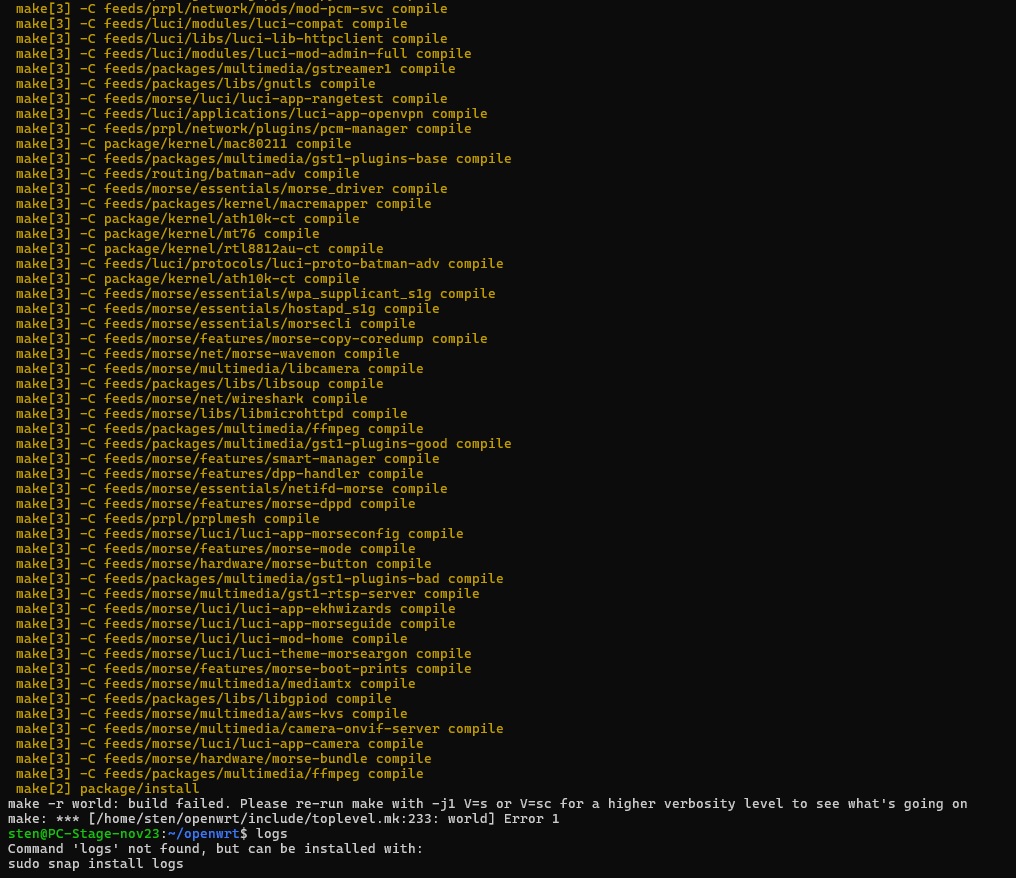
Thank you for the information I did everything you said. I downloaded the ubuntu version: 22.04.5 LTS out from the microsoft store. The first few steps went correctly and I started compiling. After 1 hour I got this error message:
You don’t need to run it with a higher verbosity level. Just look in the logs directory that I mentioned earlier for the package that failed (i.e. perl).
Thank you very much everyone james and the others who helped me from morse micro. I only need to connect the other devices and try to send messages from one station to the other one.
I got messages from station to the other station and can print the payload now. I got everything working how I wanted it thanks, to all the persons who helped!
You can change the BCF file in the Network→Wireless section of the UI, or look at /etc/config/wireless and see what it’s set to there. You can also check logread or dmesg to see what it’s currently loaded.
Most likely, the board you’re using has the OTP bits sets and it will automatically load the correct image, but some older boards do not have this and you need to specify it manually. To see what BCFs are available on the image, you can also look in /lib/firmware/morse.
But for some reason I cannot select or type anything inside of it. It doesn’t respond to any interaction. Then I tried to go to the wireless file you talked about, but I have no clue how to interact with it using linux. I first went to the location and did the commando: nano wireless, but I don’t see any settings for bcf file in there. Could you help me better understand how to change it?
A bit weird that the UI isn’t responding to any interaction. It’s just a text field, so you should be able to type into it.
For manually editing /etc/config/wireless look for the wifi-device section with option type 'morse'. Underneath this line, add the following line: option bcf '<filename>'. For example, my configuration section looks like this:
config wifi-device 'radio2'
        option type 'morse'
        option path 'platform/11200000.usb/usb1/1-1/1-1:1.0'
        option band 's1g'
        option hwmode '11ah'
        option reconf '0'
        option bcf 'bcf_mf15457.bin'
        option country 'AU'
        option channel '44'
        option disabled '0'
Obviously, use the bcf filename you’ve determined you need to use.
Ah, unfortunately you’re running into a semi-intentional limitation of the software related to whether it’s an evaluation kit or a product, and unfortunately the open source release ends up defaulting to a ‘product’ configuration because it doesn’t have morsectrl. We make it slightly harder to change the BCF in our products as providing the wrong BCF can easily violate regulatory requirements, and our products should already be loading the right BCF.
In the longer term, if you do require the BCF to be forced I would recommend changing /essentials/netifd-morse/lib/wifi/morse.sh (search for halowlink1 in this file to see how you can force the BCF based on the system).